How to Get Email Notifications for New Google Sheets Rows (No Zapier Needed)
You're using RowSink to collect signups, feedback, or sensor data into a Google Sheet. It works great—the data just appears. But you don't want to refresh your spreadsheet all day to see if something new came in.
The instinct is often to reach for automation tools like Zapier or Make to watch for new rows and send an email. But that's overkill (and often costs money). Google Sheets has a powerful, native notification system built right in.
The "Hidden" Notification Rules
Google Sheets allows you to set up rules to notify you when changes happen. Since RowSink writes data directly to your sheet, these rules trigger automatically.
Step 1: Open Notification Rules
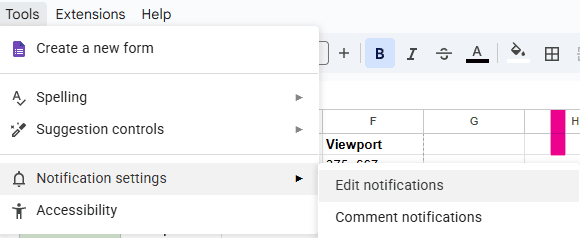
Open your Google Sheet. In the menu bar, go to Tools > Notification settings > Edit notifications.
Step 2: Configure Your Trigger
You'll see a dialog box asking when you want to be notified.
- Select Any changes are made.
This ensures you get an alert precisely when RowSink adds a new row to your spreadsheet.
Step 3: Choose Frequency
Next, choose how often you want to accept emails:
- Email - right away: Best for low-volume sheets where every row matters instantly (e.g., a "Contact Us" form).
- Email - daily digest: Best for high-volume data or when you just want a morning summary of yesterday's activity.
Click Save, and you're done.
Why This is Better Than Automation Tools
Native Notifications
- ✓ Absolutely free
- ✓ No extra accounts to manage
- ✓ Instant delivery (for Google)
- ✓ Zero maintenance
Zapier / Make
- × Can get expensive
- × Complex setup and debugging
- × Polling delays (on free plans)
- × Another service to break
That's it! You've just built a real-time notification system for your application without writing a single line of code or paying a cent.
Ready to start piping data into Sheets? Create your first RowSink endpoint today.